Blog

  • How AI and CRM Are Changing Sales Teams in 2026: What Works Now

    How AI and CRM Are Changing Sales Teams in 2026: What Works Now

    Please follow and like us:
    Tweet

    Sales teams are under more pressure than ever to respond faster, qualify leads better, and close deals with less wasted effort. In 2026, the teams that win are not necessarily the ones making the most calls — they are the ones using AI and CRM systems together to work smarter, stay organized, and follow up at the right time.

    This shift is changing how modern sales organizations operate. Instead of relying on memory, spreadsheets, or manual follow-up, top-performing teams are building workflows that help reps focus on the right prospects, at the right moment, with the right message.

    Why sales is changing

    Today’s buyers expect speed, relevance, and consistency. They want quick answers, personalized communication, and a smooth experience from the first contact to the final decision.

    At the same time, sales teams are dealing with more leads, more channels, and more competition. It is easier than ever for a prospect to fill out a form, ask for a demo, compare providers, and disappear if no one follows up quickly.

    That is why the combination of AI and CRM has become such an important trend. AI helps teams act faster and reduce repetitive work. CRM systems help teams keep track of every interaction, so no opportunity gets lost.

    What AI is doing for sales teams

    AI is no longer just a buzzword. In sales, it is being used to make teams more efficient and more responsive.

    Some of the most useful applications include:

    • Lead scoring, so reps know which prospects are most likely to convert.

    • Automatic follow-up reminders, so no one forgets to contact a lead.

    • Call and meeting summaries, so salespeople spend less time taking notes.

    • Suggested responses, so teams can reply faster to common questions.

    • Forecasting support, so managers can better understand pipeline health.

    • Task automation, so routine work does not slow down the team.

    These tools do not replace the salesperson. They reduce friction and free up time for the conversations that actually move deals forward.

    Why CRM still matters

    A CRM is the foundation that keeps the whole sales process organized. Without it, even the best AI tools cannot do much.

    The CRM stores contact information, tracks deal stages, records communication history, and gives managers visibility into the pipeline. It helps a team know who was contacted, who needs a follow-up, and which opportunities are moving forward.

    When CRM data is clean and current, AI can do a much better job. For example, AI can prioritize leads, but only if the CRM has accurate data. AI can recommend the next step, but only if the system knows where the prospect is in the funnel.

    In other words, AI makes CRM more powerful, and CRM gives AI something useful to work with.

    What works now in 2026

    The most effective sales teams are not trying every new tool. They are focusing on a few practical systems that improve daily execution.

    1. Faster lead response

    Speed matters. The sooner a team responds to a lead, the better the chance of starting a real conversation. AI can help identify new leads instantly and route them to the right rep.

    This is especially important when leads come from website forms, paid ads, chatbots, or social media. If the response takes too long, the prospect may move on.

    2. Better lead qualification

    Not every lead deserves the same amount of time. AI can help score leads based on behavior, fit, and interest level. That allows sales reps to prioritize the most promising opportunities first.

    This saves time and reduces frustration. It also helps teams avoid spending too much energy on leads that are unlikely to buy.

    3. Smarter follow-up

    A lot of deals are lost because someone simply forgot to follow up. CRM reminders and AI-generated task prompts help prevent that problem.

    The best teams are using follow-up systems that are structured, timely, and personalized. Instead of sending random messages, they follow a process that matches the buyer’s stage and interest level.

    4. Clearer pipeline visibility

    Managers need to know where deals stand, what is slowing them down, and which reps need support. CRM dashboards make this possible.

    When AI helps analyze patterns in the pipeline, managers can see trends more quickly. That helps them coach better, forecast more accurately, and spot problems earlier.

    5. Less manual work

    Salespeople spend too much time on administrative tasks. AI can help with note-taking, email drafting, meeting summaries, and task updates.

    That means more time for selling and less time for data entry. For many teams, that alone is a major productivity win.

    How AI and CRM work best together

    The biggest mistake teams make is using AI and CRM as separate tools. The real value comes when they are connected into one process.

    Here is what that looks like in practice:

    1. A lead comes in from the website.

    2. The CRM captures the lead automatically.

    3. AI scores the lead based on fit and behavior.

    4. The system assigns the lead to the best rep.

    5. The rep gets a reminder to follow up quickly.

    6. AI suggests a personalized email or call note.

    7. The CRM tracks the interaction and updates the pipeline.

    This kind of workflow helps teams move faster without losing the human touch. The technology handles the repetitive steps, while the rep focuses on building trust and closing the deal.

    Common mistakes to avoid

    Even with strong tools, many teams still struggle because of poor execution. Some of the most common mistakes include:

    • Using AI without a clear sales process.

    • Letting CRM data become incomplete or outdated.

    • Automating too much and sounding robotic.

    • Ignoring lead quality while focusing only on lead volume.

    • Failing to train the team on how to use the tools consistently.

    • Measuring too many metrics instead of focusing on the most important ones.

    Technology only helps when the team actually uses it well. A clean process is more important than having the newest software.

    Metrics that matter

    If a sales team is using AI and CRM correctly, a few key metrics should improve.

    Important metrics to watch include:

    • Lead response time.

    • Lead-to-meeting conversion rate.

    • Follow-up completion rate.

    • Opportunity-to-close ratio.

    • Sales cycle length.

    • Pipeline accuracy.

    These numbers show whether the system is really helping the team perform better. If the tools are not improving these areas, the process may need to be adjusted.

    Why this topic matters for content

    This is a strong blog topic because it speaks directly to the biggest challenges sales teams are facing right now. It is practical, timely, and easy to connect with real business problems.

    It also works well for different audiences. A sales manager sees process improvement. A founder sees revenue growth. A rep sees less admin work and better prioritization. That makes the topic broad enough to attract attention while still being specific enough to offer value.

    If your blog is aimed at business owners, sales leaders, or marketing teams, this is the kind of article that can generate strong engagement. It shows that your brand understands the real pressure sales teams are under and knows how to solve it.

    Final thoughts

    In 2026, sales success is less about pushing harder and more about working smarter. AI and CRM are helping teams respond faster, stay organized, and focus on the opportunities that matter most.

    The winning formula is simple: use AI to reduce friction, use CRM to keep structure, and keep the human seller at the center of the process. That combination creates better conversations, better follow-up, and better results.

    Please follow and like us:
    Tweet
  • How Sales Teams Can Use Conversational AI This Week to Close More Deals

    How Sales Teams Can Use Conversational AI This Week to Close More Deals

    Please follow and like us:
    Tweet

    Conversational AI—chatbots and AI sales assistants—are no longer experimental tools; they’re practical, revenue-driving systems sales teams can deploy this week to increase meetings and close rates. This article gives sales managers seven immediate tactics, ready-to-use chatbot scripts, and a one-week implementation checklist so your reps see faster responses, better-qualified leads, and more booked appointments.


    Why conversational AI matters now
    Buyers expect near-instant responses across channels, and delays cost qualified opportunities. Conversational AI handles first-touch engagement 24/7, letting your sales reps focus on high-value conversations while the AI qualifies prospects and books meetings. When used correctly, these systems improve lead response time, increase conversion rates from chat to meeting, and reduce no-shows through automated confirmations.

    Tactical wins you can implement this week


    • Use smart triage to qualify leads automatically. Ask three quick qualifying questions (budget range, timeline, primary pain point) and route high-intent leads to reps immediately.

    • Book meetings inside the chat flow. Integrate your calendar (Google/Outlook) and show available slots rather than asking prospects to email — this reduces friction and increases booked meetings.

    • Escalate to live reps at the right moment. Set rules that hand off to a human when a chat indicates high purchase intent or complex objections.

    • Capture micro-conversions. If a visitor won’t book, capture smaller wins: download an asset, request a demo, or sign up for a webinar. These keep prospects in the funnel.

    • Personalize the experience by locale and language. Detect language and offer Spanish/English flows automatically to increase comfort for U.S. Hispanic prospects.

    • Use AI to summarize chat histories for reps. Provide a short one-paragraph summary and suggested next steps when a lead is routed to sales.

    • Test and optimize one script per week. A/B test a qualification question or CTA and measure the uplift in meetings-booked.

    7 Chatbot scripts sales reps can use today

    • Quick qualifier (first message): “Hi — I’m the assistant for [Company]. Quick question: are you exploring solutions now, within 1–3 months, or just researching?”

    • Budget qualifier: “Which range best matches your budget? A) <$1k B) $1k–$5k C) >$5k”

    • Pain-point probe: “What outcome matters most: A) Save time, B) Reduce costs, C) Improve compliance?”

    • Book-a-meeting close: “Great — I can schedule a 20-minute call with a senior rep. Which works better: tomorrow morning or afternoon?” (Show two specific slots.)

    • Objection softener: “I understand — what’s the biggest concern holding you back? I’ll share one quick example of how we solved that for a similar customer.”

    • Lead-nurture fallback: “If now isn’t right, would you like a one-page case study in Spanish or English?”

    • Human escalation trigger: “I’ll connect you now to a rep who can help with pricing and implementation — is phone or video better?”

    Measuring success: three KPIs to track immediately

    • Response-to-meeting rate: percent of chat conversations that result in a booked meeting.

    • Qualified-lead conversion rate: percent of AI-qualified leads that convert to opportunities.

    • Chat-assisted average order value (AOV): revenue from deals where the initial contact or qualification came through chat.

    Bilingual and cultural tips for U.S. Hispanic audiences


    • Offer language choice up front and use culturally familiar phrasing; start Spanish flows with warm, direct greetings like “¡Hola! ¿En qué te podemos ayudar hoy?” to build trust.

    • Localize examples and case studies (U.S. states, industries common among Hispanic entrepreneurs) rather than literal translations.


    • Use short, plain-language sentences in both languages; avoid legalese or industry jargon in initial chat steps to keep friction low.


    One-week implementation checklist (quick-start)
    Day 1: Select a conversational platform (choose one with calendar and CRM integrations).
    Day 2: Build a basic qualification flow with the three qualifying questions and a booking step.
    Day 3: Create two language flows (English and Spanish) and test message tone with a small internal group.
    Day 4: Integrate calendar and CRM; set escalation rules to route hot leads to live reps.
    Day 5: Publish the chat on your highest-traffic page (pricing or product page) and set live monitoring for handoffs.
    Day 6: Run A/B test on the booking CTA (example: “Book a demo” vs “See pricing now”).
    Day 7: Review KPIs, collect rep feedback, and iterate the script.

    Please follow and like us:
    Tweet
  • The Enterprise Handoff Crisis: How Product-Led and Sales-Led Teams Can Bridge the Gap

    The Enterprise Handoff Crisis: How Product-Led and Sales-Led Teams Can Bridge the Gap

    Please follow and like us:
    Tweet

    Product-led growth (PLG) lets the product drive acquisition, conversion, and expansion with minimal sales involvement. Sales-led growth (SLG) relies on a sales team to guide prospects through the buying journey. Both are powerful strategies, but many companies face a critical failure point: when PLG users hit enterprise scale and need sales assistance, the handoff often breaks momentum, trust, and revenue potential.


    Companies that master seamless, graduated handoffs between PLG and SLG achieve 130%+ Net Revenue Retention while scaling both motions. Here’s how to make it work.


    The Three Ways Typical Handoffs Fail

    1. Momentum Disruption

    PLG users expect instant gratification. When sales processes suddenly stall their expansion, they lose the momentum that drove their initial success.

    2. Context Loss

    Sales reps inherit accounts without understanding the PLG journey—what features were adopted, usage patterns, or expansion signals. This forces them to start from scratch instead of leveraging existing product knowledge.

    3. Trust Erosion

    Users feel deceived when self-serve simplicity suddenly becomes “contact sales.” A typical failed handoff: a user hits an arbitrary threshold ($10K ARR, 50 seats), gets assigned to a sales rep, and receives a cold email introducing a “new account manager”.


    Five Enterprise Signals That Predict Handoff Readiness

    Sales reps need real-time product usage data to identify when prospects are ready to buy. Track these leading indicators:

    Signal What to Monitor Why It Matters
    Team Expansion Velocity 10+ users added within 30 days across multiple departments Indicates enterprise-scale growth; needs SSO, advanced permissions, compliance
    Feature Complexity Adoption Advanced integrations, custom workflows, admin features activated Shows enterprise sophistication; ready for API limits, custom implementations
    Support Escalation Patterns Tickets shift from “how-to” to custom configurations, bulk operations Users outgrowing self-serve; sales can address enterprise needs
    Pricing Page Behavior Repeated visits to enterprise pricing pages Intent signal; triggers pre-sales engagement, not reactive follow-up
    Usage Threshold Clustering Consistently operating near plan limits (API calls, storage, seats) Prime for expansion; engage before frustrating limits hit

    Combining team expansion + feature complexity + support escalation predicts enterprise readiness with 78% accuracy.


    What Sales Reps Need from Product Signals

    A. Persona Targeting for Cross-Sell

    Track how key personas (CTOs, VP Engineering, Engineering Managers) use new features. Create Slack alerts for salespeople when specific titles engage with new functionality.

    B. Account Adoption Signals for Expansion

    Monitor organic invites sent to new users, saturation of usage based on caps, and new feature engagement. These indicate expansion readiness.

    C. Custom PQLs (Product Qualified Leads)

    Create custom PQL models using multiple signals simultaneously:

    • Accounts with >500 employees + 5 new users added last week + core feature used first time

    • Accounts using >10GB data/month with tailored outreach sequences

    A strong PQL definition captures three categories:

    1. Customer fit: Industry, geography, company size, user role/title

    2. Product usage: DAU, frequency, recency, time spent, feature usage, invites sent

    3. Buying intent: Visited pricing page, clicked “talk to sales,” new seats added

    D. Real-Time Usage Data Benefits

    • Right timing: Find optimal moments to upsell/cross-sell instead of waiting for renewal

    • Feature correlation: Discover features most correlated to conversion

    • Active usage insight: See if provisioned users are actively using the product

    • Objective data: See what customers actually do, not just what they say


    What Product Teams Need from Sales

    Feedback on Product Gaps

    Sales teams should record product gaps or opportunities. This input reveals what features enterprise deals are requesting.

    Deal Context & Customer Pain Points

    Sales must communicate buyers’ pain points for use case-oriented discussions. Sales reps become trusted advisors who understand core use cases.

    Enterprise Market Intelligence

    • What initiatives companies are investing in (from hiring signals)

    • What tech stack prospects use (for integrations/consolidation narratives)

    • How companies talk about challenges and objectives (for personalized messaging)

    Closed-Loop Feedback

    Product teams need handoff success rates, time-to-close for handed-off accounts vs. cold prospects, and post-handoff satisfaction scores.


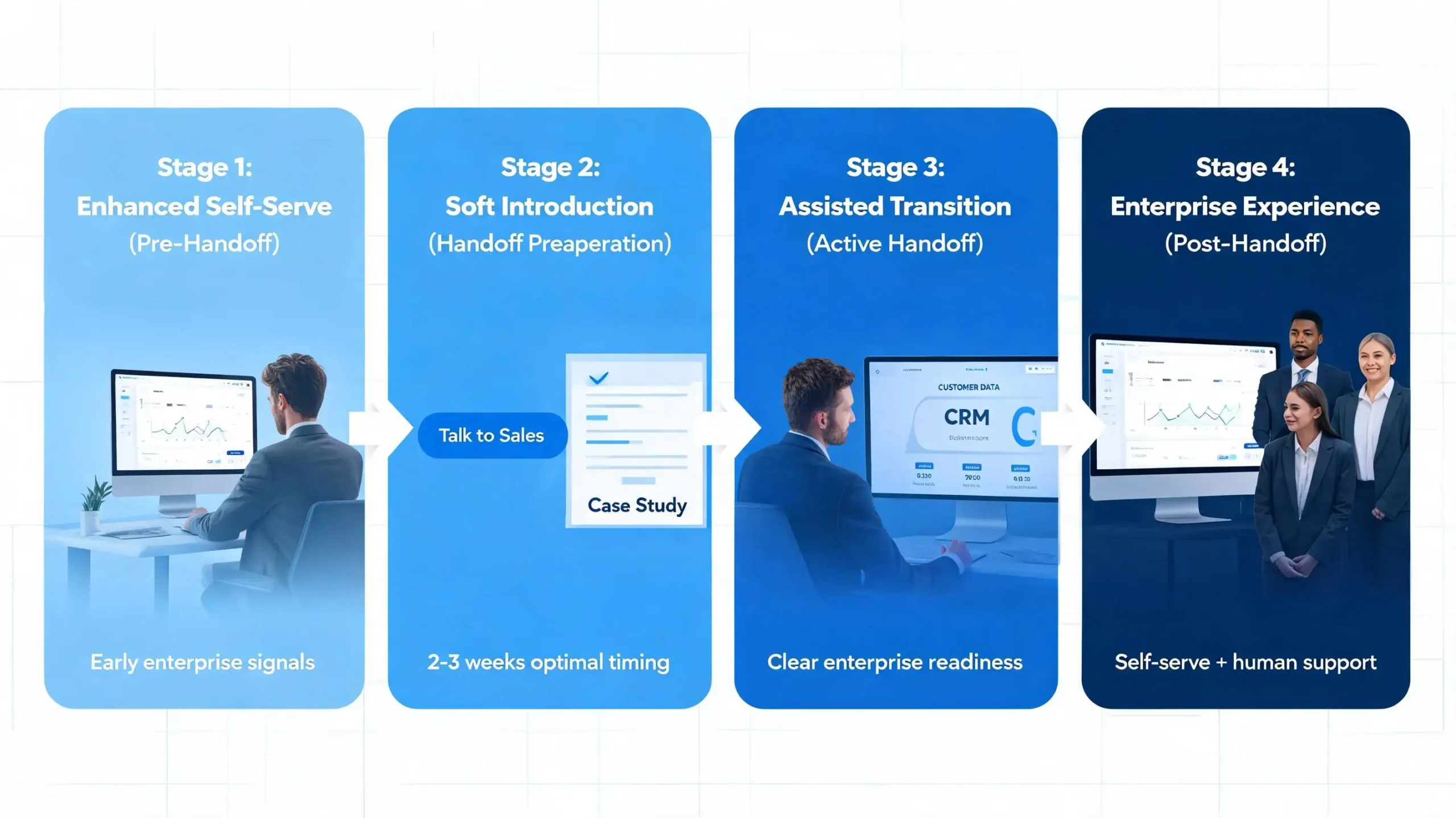
    The Four-Stage Graduated Handoff Framework

    Instead of binary handoffs, build graduated transition experiences:

    Stage Name When What Happens
    1 Enhanced Self-Serve Early enterprise signals Enterprise content, demo access, success team chat, pricing visibility
    2 Soft Introduction Multiple signals + Stage 1 engagement “Talk to sales” button, case studies, rep intro email, Q&A invite
    3 Assisted Transition Clear enterprise readiness CRM handoff with full context, customized proposal, solutions engineer intro
    4 Enterprise Experience After enterprise sale Self-serve + human support, user maintains admin control, regular check-ins

    Optimal timing: Users engaged in Stage 2 for 2-3 weeks before Stage 3 show highest conversion rates.


    Real Results: A Case Study

    A project management SaaS with strong PLG but struggling enterprise growth achieved:

    Metric Before After (12 months)
    Enterprise revenue growth 15% YoY 340% increase
    Handoff conversion Unknown 67% converted to enterprise
    Sales cycle Baseline 45% shorter vs. cold prospects
    Customer satisfaction Unknown 89% rated transition “excellent/very good”
    12-month retention Baseline 23% higher for handoff customers

    Sales reps referencing specific PLG journey elements achieved 2.3x higher conversion rates.


    Five Common Handoff Mistakes to Avoid

    1. Arbitrary handoff triggers: Simple thresholds without behavioral readiness catch users not ready

    2. Abrupt experience changes: Switching from self-serve to “contact sales” overnight kills momentum

    3. Context-free sales outreach: Generic enterprise pitches feel tone-deaf

    4. Feature gating without warning: Suddenly restricting features breaks trust

    5. One-size-fits-all messaging: Same pitch for all users regardless of PLG journey


    Six KPIs That Measure Handoff Effectiveness

    • Handoff Conversion Rate: 40-60% for well-executed handoffs (convert to enterprise within 90 days)

    • Context Utilization Score: Reps referencing PLG data = 2.3x conversion

    • Transition Satisfaction Score: 80%+ rating transition as positive

    • Post-Handoff Retention Rate: Higher 12-month retention than cold enterprise

    • Revenue Per Handoff: Context-rich handoffs command premium pricing

    • Time to Enterprise Value: Faster than cold enterprise due to existing product knowledge


    The Bottom Line

    The enterprise handoff crisis isn’t inevitable. By tracking the right signals, building graduated transitions, and creating feedback loops between sales and product teams, companies can scale both PLG and SLG without sacrificing momentum or trust. The result: faster enterprise revenue growth, shorter sales cycles, and customers who feel the transition was seamless—not disruptive.

    Please follow and like us:
    Tweet
  • Can you write the article for me? Packaging Strategy for 2026: Bundles, Add‑Ons, and AI Tiers (and How to Sell Each)

    Can you write the article for me? Packaging Strategy for 2026: Bundles, Add‑Ons, and AI Tiers (and How to Sell Each)

    Please follow and like us:
    Tweet

    In 2026, the way you package your product is no longer about “Starter, Pro, and Enterprise” with a laundry list of features. It’s about orchestrating bundles, add‑ons, and AI tiers so that buyers see clear value, sales reps have clean upsell paths, and your product can scale profitably without constant plan changes.


    For SaaS and product‑led companies, the winning playbook is simple:

    • Bundles solve a specific job‑to‑be‑done.

    • Add‑ons monetize power users and edge cases.

    • AI tiers price intelligence the way buyers actually experience it: speed, quality, and scope.

    Here’s how to design and sell each of them—and how to combine them into one coherent 2026 packaging stack.


    Why packaging matters in 2026

    Buyers in 2026 are no longer impressed by “more features.” They’re looking for clear outcomes: faster workflows, fewer manual tasks, and measurable time or cost savings.

    At the same time, AI is no longer a novelty tacked on at the end. It’s a core engine that runs everything from research and summarization to data enrichment and forecasting. That means your packaging must reflect how AI is used—not just whether it’s “on or off.”

    The three pillars that matter most in 2026 are:

    • Workflow‑first bundles that put together everything a team needs to do a job.

    • Modular add‑ons that let advanced users pay for extra capabilities.

    • AI tiers that differentiate quality, speed, and scale of AI usage.

    If you design these three elements intentionally, you can increase average revenue per user (ARPU), reduce churn, and make sales conversations far simpler.


    Step 1: Design bundles that solve real jobs

    A bundle in 2026 is not “all the features.” It’s a curated stack of capabilities that solves a specific job‑to‑be‑done for a specific persona.

    For example:

    • A “Recruiter Starter Pack” might include job‑posting, candidate inbox, and basic AI matching.

    • A “Sales Growth Bundle” might combine outreach sequencing, meeting‑notes AI, and reporting in one package.

    Key principles for bundles in 2026:

    • Bundle by job, not by feature. Map each bundle to a persona and workflow (e.g., “Onboarding Manager,” “Customer Success Lead”).

    • Create clear savings vs à‑la‑carte. Show the total price of the bundle versus buying each piece separately.

    • Keep the bundle simple enough to explain in one sentence. If you need three sentences to explain it, the bundle is too complex.

    How to sell bundles in 2026:

    • For product‑led motion: Place bundles prominently in the in‑app upgrade path and highlight the time or cost saved.

    • For sales‑led motion: Turn bundles into “stacks” you can tailor in discovery calls (e.g., “This is the Sales Growth Stack we usually recommend for teams like yours.”).

    • Messaging angle: “Get everything you need for [job] in one package—no more picking and paying for each piece.”


    Step 2: Use add‑ons to monetize power users

    Add‑ons are the “power‑user” layer of your packaging. They let you keep core plans simple while still capturing extra revenue from teams that push your product to its limits.

    In 2026, the most effective add‑ons are:

    • AI‑agent add‑ons: e.g., “Research Agent,” “Contract Review Agent,” “Meeting‑Summary Agent.”

    • Platform‑integration add‑ons: CRM sync, Slack AI, or email enrichment.

    • Usage‑based add‑ons: extra credits, tokens, or processing capacity for AI workloads.

    Guidelines for designing good add‑ons:

    • Solve a visible, painful edge case. If the user wouldn’t notice the absence of the add‑on, it’s not valuable enough.

    • Have a clear usage metric. e.g., “per 1,000 records enriched,” “per 100 AI queries,” or “per workspace.”

    • Don’t bake mission‑critical features into them. Add‑ons should feel like “superpowers,” not survival tools.

    How to sell add‑ons in 2026:

    • Limit usage caps in trials and lower tiers. When users hit those limits, show them an upgrade to the add‑on.

    • Use in‑app nudges at the moment of friction. For example, “You’ve used all your AI queries this month. Upgrade to the Research Add‑on to keep going.”

    • Sales angle: Frame add‑ons as “people‑multipliers.” For example: “One AI Research Agent can save a team 10–15 hours a week.”


    Step 3: Structure AI tiers that buyers can understand

    AI tiers are not just about “turning AI on” in higher plans. They’re about differentiating the quality, speed, and scale of AI, while pricing them in a way that matches your unit economics.

    Here’s a practical way to think about AI tiers in 2026:

    1. Audit your unit economics

    Before you price AI, know your costs:

    • Cost per query, token, or task.

    • Latency and model quality differences between small and large models.

    • Any infrastructure or API costs that scale with usage.

    This lets you build tiers that are profitable, not just aspirational.

    2. Define value metrics

    Choose metrics that reflect how buyers experience AI:

    • Queries per month.

    • Tasks resolved (e.g., summaries, classifications, or decisions).

    • Time saved or deals accelerated.

    These metrics become the anchor for your tiers.

    3. Choose a pricing model

    In 2026, common patterns are:

    • Flat + usage: Fixed monthly fee plus credits or tokens.

    • Pure usage: Price per query or task, with bulk discounts.

    • Bundled credits: A set number of credits included in each plan, with top‑up options.

    The best model depends on how predictable your customers’ AI usage is.

    4. Create tiered access

    At a minimum, think of three AI‑access levels:

    • Basic AI:

      • Limited credits.

      • Slower or lighter models.

      • Standard support.

    • Pro AI:

      • Higher‑speed models or more credits.

      • Fine‑tuned or workflow‑specific AI (e.g., “Sales‑focused summarization”).

      • Priority routing or faster response times.

    • Enterprise AI:

      • Dedicated agents or custom fine‑tuning.

      • Guaranteed SLAs and uptime.

      • On‑prem or private‑cloud options where applicable.

    How to sell AI tiers:

    • Lead with ROI: Show case studies or benchmarks that map AI usage to time saved, deals won, or errors reduced.

    • Use simple language: Avoid technical jargon. Instead of “LLM model parameters,” say “faster, more accurate answers.”

    • Sales scripts: “Basic AI gets you started; Pro AI unlocks scale; Enterprise AI embeds AI into your core operations.”

    • Self‑serve paths: Let users see when they’re hitting their AI limit and offer an in‑app upgrade to the next tier.


    Step 4: Combine bundles, add‑ons, and AI tiers in one stack

    The real power of 2026 packaging comes from stacking these three elements together into a single architecture.

    Imagine this structure for a B2B SaaS product:

    • Base plans (Starter, Pro, Business):
      Core features and basic AI access.

    • Workflow bundles:
      Optional pre‑built stacks on top of base plans (e.g., “Sales Growth Bundle,” “Support Ops Bundle”).

    • AI tiers:
      A vertical layer that runs across all plans (Basic AI, Pro AI, Enterprise AI).

    • Add‑ons:
      Horizontal “spikes” that plug into specific workflows (e.g., “CRM Sync,” “AI Research Agent,” “Advanced Reporting”).

    This structure gives you:

    • Clear paths for product‑led growth (upgrade to a bundle or add‑on).

    • Rich territory for sales‑led deals (custom bundles and AI tiers).

    • Flexibility to match different company sizes and AI appetites.

    Example:

    • A small startup might start on a Starter plan with Basic AI and no bundles.

    • As they grow, they add a Sales Growth Bundle and a CRM‑Sync add‑on, then upgrade to Pro AI.

    • At enterprise scale, they move to Enterprise AI with custom fine‑tuning and a tailored bundle.


    Step 5: How to message and sell this packaging to buyers

    To make this stack work, you need clear, persona‑driven messaging.

    For startups and SMBs

    • Emphasize simplicity and speed:

      • “Start with a bundle that gives you everything you need out of the gate.”

      • “Add AI later as you scale, without overpaying for unused capacity.”

    For mid‑market teams

    • Talk about bundles as value packs and AI tiers as scalability levers:

      • “Tiers that match your usage and budget, bundles that simplify procurement.”

      • “Add‑ons that let your power users move faster without changing the core plan.”

    For enterprise buyers

    • Position custom bundles and Enterprise AI as core to their operations:

      • “Custom AI tiers and bundles aligned to your workflows and compliance needs.”

      • “Guaranteed performance and uptime, so your teams can depend on AI like any core system.”

    Sales and marketing tactics for 2026:

    • Pricing pages: Show side‑by‑side comparisons of bundles vs à‑la‑carte, and AI tiers vs competitors.

    • Case studies: Tie each bundle, add‑on, or AI tier to a measurable outcome (e.g., “Bundle X cut onboarding time by 60%”).

    • Onboarding emails: When users hit AI limits or start using add‑ons heavily, trigger messages that guide them to the next tier or bundle.


    Pitfalls to avoid in 2026 packaging

    Even with a strong framework, you can still mess up your packaging if you’re not careful.

    • Over‑complication: Too many plans, too many add‑ons, or unclear AI limits make buyers freeze. Keep the core plan architecture simple and add layers only where they add real value.

    • Cannibalizing revenue: Giving away too much AI in free tiers or trials can make it hard to upsell later. Treat AI as a monetizable capability, not a free gimmick.

    • Ignoring variable costs: Pricing AI tiers without measuring compute or token costs can wreck margins. Always tie AI pricing back to your unit economics.

    Please follow and like us:
    Tweet
  • Usage-based & token-based pricing: how reps should qualify, forecast, and negotiate (for AI products)

    Usage-based & token-based pricing: how reps should qualify, forecast, and negotiate (for AI products)

    Please follow and like us:
    Tweet

    Usage- and token-based pricing align cost with consumption, which makes AI-enabled products fairer for buyers but more complex for sellers; sales reps who master qualification, forecasting, and negotiation will close higher-quality deals and protect margin while enabling growth. Below is a long-form article you can publish as-is, with practical scripts, examples, and contract language tailored to AI products and services.


    AI products — from embedded generative features to inference APIs — incur real, variable compute and licensing costs that scale with customer usage, so tying price to consumption makes economic sense for both vendors and buyers. Flat licenses can overcharge light users and undercharge heavy ones, distorting incentives and creating friction when an early POC unexpectedly explodes in production. Usage-based and token-based models map spend to activity (API calls, tokens consumed, compute-minutes, or processed records), improving fairness and enabling sellers to capture upside from successful customers while giving buyers a lower entry barrier.

    However, the same dynamics that make metered pricing attractive also introduce unpredictability for customers and forecasting headaches for sellers. Bill shock, unclear unit definitions (what exactly is a “token” or “call”), and model-driven cost variance (a model upgrade that increases token usage per prompt) create negotiation complexity. That’s why sales teams must treat qualification, forecasting, and negotiation as an integrated discipline: discover consumption signals early, model realistic scenarios, and negotiate with guardrails that protect revenue and customer trust.

    This article gives a tactical playbook for sales reps and leaders selling AI products: how to qualify usage risk, how to forecast revenue from metered accounts, packaging options that balance predictability with upside, negotiation tactics, contract language to include, and the operational enablers and KPIs reps need.

    Qualifying deals differently (900 words)
    Why qualification changes
    Traditional qualification focuses on fit, budget, timeline, and stakeholders. For usage-based AI products, consumption patterns become a first-class concern because they drive cost, revenue, and churn risk. A customer with strong product-market fit but unbounded usage spikes can quickly generate huge costs and reach out for refunds or renegotiation. Reps must discover both volume and variability.

    Core discovery areas

    • Workflows and user behavior: Ask whether the use is batch, scheduled, or real-time interactive; whether usage is user-driven or automated (system-to-system). Batch ETL jobs have predictable windows; real-time user prompts can spike unpredictably.

    • Expected volume and peaks: Capture monthly average, expected peak day/hour, and growth trajectory. Quantify the largest single-event volume you might see (e.g., Black Friday, end-of-quarter processing).

    • Per-request complexity: Determine average token length, average response size, number of API calls per completed business action, and whether advanced features (multi-turn context, embeddings, multimodal data) are used.

    • Value-per-outcome: Map usage to business value (e.g., tokens per qualified lead, tokens per processed claim). If you can quantify revenue or time saved per action, you can price to value rather than raw consumption.

    • Budget control and procurement maturity: Find out whether procurement accepts variable billing, needs hard caps, or insists on predictable spend with renewals and PO processes.

    Qualification script (compact)
    Use this script in discovery calls to surface consumption risk quickly:

    • “Tell me about the core workflow that will call our API — how often does it run and what triggers it?”

    • “How many calls per user per day do you anticipate in month one, month six, and month twelve?”

    • “Can you share a small sample or estimate of typical request size (characters/tokens) and expected response size?”

    • “Do you expect seasonal peaks or trigger events that cause bursts?”

    • “Is there a budget ceiling we must design around, or do you prefer pay-as-you-go with alerts?”

    Red flags that need escalation

    • “We don’t know usage yet” with no plan to measure — treat as higher risk.

    • Wide uncertainty around spikes (no guardrails for what happens on sudden scale).

    • Use cases with heavy multimodal processing (video, images, large-context models) without cost allocation plans.

    • Procurement that absolutely refuses any overage or true-up mechanism.

    Forecasting metered revenue (1,000 words)
    Forecasting principle: scenario-based modeling
    Metered models require scenario-based forecasts rather than single-point estimates. Build conservative, baseline, and upside scenarios and capture assumptions for growth rate, per-user token usage, and spike multipliers. This approach helps convert a nebulous POC into a revenue plan with probabilities.

    selling Tokens

    Steps to a usable forecast

    1. Translate telemetry into per-outcome units: Use POC telemetry to compute tokens per completed action, tokens per active user, tokens per hour, etc. If no telemetry exists, use industry benchmarks for your product or request a small pilot dataset.

    2. Build usage-per-seat assumptions: Derive an average tokens-per-seat-per-month metric for the buyer’s personas. Separate heavy users from light users (power users vs. lurkers).

    3. Model adoption curves: Apply realistic ramp rates — e.g., 10% month-over-month in early months, slower after product-market fit — and show how usage scales with active user count.

    4. Scenario multipliers for spikes: Add a spike factor for each scenario (e.g., baseline 1.0, conservative 0.6, upside 2.5) to account for unpredictable events.

    5. Map usage to revenue: Multiply expected tokens by price-per-token, or apply tiered pricing rules in your pricing tiers.

    6. Unit economics check: Compute gross margin per token by subtracting the cost per token (cloud inference, third-party model fees) from the price-per-token. Use margin to decide on minimum pricing and acceptable discounts.

    7. Rolling forecast reviews: Set calendar reviews with customer success to update assumptions monthly for first 6–12 months after go-live.

    Example (concise)
    A POC shows 10,000 tokens/day. For baseline, assume adoption multiplies by 3x to 30k/day at go‑live; for upside, expect 200k/day in six months. With a $0.0003 price-per-token and cost-per-token of $0.00005, baseline monthly ARR: 30k * 30 days * $0.0003 = $270, and upside becomes substantial — underscoring the need for committed buckets or caps to lock ARR while preserving upside.

    Packaging that balances predictability and upside (1,000 words)
    Common structures and when to use them

    • Metered-only: Best for self-serve or low-commitment customers who won’t accept a base fee. Pros: low friction; cons: unpredictable ARR and higher churn risk.

    • Base subscription + metered overage (recommended): A fixed monthly fee covers baseline predictable load (with included tokens), while overages are charged at a metered rate. This preserves predictable revenue and lets heavy users pay more.

    • Prepaid token bundles: Customers buy tokens at a discount upfront (monthly or annually). Good for buyers who want budget predictability but also want to lower unit cost.

    • Committed spend / enterprise packs: Annual committed tokens at discounted rates with true-up clauses and minimums. Use for strategic accounts where both parties want predictability.

    • Hybrid (prepaid + overage + caps): Give buyers prepaid certainty, true-up for growth, and hard caps to prevent bill shock.

    Packaging rules of thumb

    • Always include tiered overage rates (lower rate for first overage band, higher for extreme overages) to discourage runaway consumption while signaling fairness for moderate growth.

    • Combine prepaid commitments with a true-up mechanism to capture growth without constant renegotiation.

    • Offer one-time “scale uplift” services (e.g., model optimization, batching strategies) to lower customer cost per token, creating value and reducing long-term usage growth that erodes margin.

    • Provide an auto-throttle or queue option as a last-resort safety for customers who want strict cost limits.

    Negotiation tactics and playbook (900 words)
    Anchor on value, not tokens
    Reps should anchor conversations on the business outcome. Show the cost per outcome (e.g., cost per qualified lead, cost per processed claim) rather than just token price. Buyers relate better to outcomes and ROI.

    Concession framework: trade discounts for commitments

    • Term length: Offer discounts for 12–24 month commitments.

    • Committed tokens: Discounted price in exchange for committed annual token purchases; true-up quarterly.

    • Payment cadence: Additional discount for annual prepayment.

    • Case-study access: Give customer case study usage in exchange for lower rates early on.

    Negotiation tactics (specific)

    • Offer a pilot with a capped token allowance and a defined telemetry review at pilot end. Use pilot telemetry to justify committed pricing.

    • Use rate cards with clear escalation bands. Be explicit: “First 1M tokens at $X, next 2M at $Y, >3M at $Z.”

    • Protect margin with a “compute-intensive” add-on: charge a premium for operations that are disproportionately costly (long-context generations, multimodal heavy processing).

    • Include a model-change clause that addresses material shifts in token accounting or costs when the vendor upgrades to a costlier model generation.

    • Require minimum ARR or minimum committed token spend for enterprise discounts.

    Negotiation scripts

    • For buyer worried about volatility: “We can set a baseline committed token package to lock your unit price and a monthly cap with automatic alerts — if you exceed the cap, we’ll pause non-critical traffic and trigger a quick review.”

    • For buyer demanding a lower unit price: “We can reduce unit price if you commit to X months or purchase Y tokens upfront — in return, we’ll assign a technical success manager to optimize your usage.”

    Contract language and legal considerations (600 words)
    Define unit semantics clearly
    Contracts must unambiguously define what counts as a token or a call, how partial tokens are measured, whether retries count, how truncated responses are billed, and what happens with cached responses. Ambiguity here creates billing disputes.

    Include these clauses

    • Measurement and reporting: Vendor’s measurement is the source of truth; include access to usage dashboards and monthly exportable reports.

    • Billing cadence and true-up: Monthly invoicing with quarterly true-up for committed spends.

    • Caps, throttling, and emergency measures: Define hard caps and throttling policies and the escalation path to increase capacity.

    • Model change and cost shift clause: If vendor changes the model or architecture in a way that materially increases cost per token, vendor will provide 60 days’ notice and a temporary protection (discount or cap) while the parties negotiate.

    • Audit and dispute resolution: Simple process to dispute a charge within 30 days, with clear escalation to billing and a quick arbiter (e.g., joint usage review) before formal legal action.

    • Data, IP, and privacy: Specify responsibilities for training data, retention, and any customer-provided data that increases processing needs.

    • Termination and wind-down: Define how prepaid tokens are treated at termination and provide a wind-down window for critical use cases.

    Operational enablement and tooling (500 words)
    What reps need to sell metered plans

    • Interactive pricing calculator: A single-sheet or web tool where reps input expected users, tokens per user, and spikes to show baseline, conservative, and upside ARR. This calculator should include cost-per-token input that sales ops can update as cloud or model costs change.

    • Telemetry templates: Standardized event logs and POC measurement scripts customers can run, enabling apples-to-apples token estimates.

    • Playbooks and clause library: Pre-approved contract snippets for caps, throttles, pilot allowances, and change control.

    • Dashboards and alerts: Customer-facing dashboards with usage thresholds and automatic alerts to the buyer and vendor billing owner.

    • Training and shadowing: Roleplay negotiating spikes, objections about volatility, and explaining token math.

    KPIs for sellers and revenue ops

    • POC-to-production conversion rate under metered plans.

    • Average tokens-per-active-user and tokens-per-outcome.

    • Frequency and dollar impact of overages.

    • Forecast accuracy (variance between forecasted token usage and actual).

    • ARR per committed token and margin per token.

    Product design and instrumentation (400 words)
    Build for commercial conversations
    Product teams must design observability, controls, and cost-smoothing features to support sales. This includes:

    • Quotas and rate limits per API key, per account, and per user.

    • Billing-grade telemetry that breaks down consumption by endpoint, user, feature, and model version.

    • Alerts and pre-emptive warnings: automated messages when usage approaches set thresholds.

    • Cost-optimizing features: batching, adaptive sampling, caching, and lower-cost model fallbacks.

    These controls reduce buyer anxiety and shorten sales cycles by demonstrating that the vendor can prevent bill shock and partner on cost optimization. Instrumentation that ties usage to business outcomes (e.g., tokens per processed claim) is especially persuasive.

    Buyer psychology and positioning (350 words)
    Addressing adoption anxieties
    Buyers worry about unpredictable bills and black-box pricing. Reps should lead with transparency: show the math, offer tools to control spend, and propose pilots that produce telemetry. Position metered/token pricing as fair: customers pay for what they use and can scale economically, rather than overpaying for unused capacity.

    Framing examples

    • For finance teams: present a prepaid bundle with a worst-case sensitivity analysis and options to cap spend.

    • For engineering: show how rate limits and batching lower operational costs.

    • For product owners: demonstrate cost-per-action and how optimizations (prompt engineering, caching) reduce unit cost and improve ROI.

    Illustrative example — from pilot to committed ARR (600 words)
    Scenario
    A SaaS vendor sells an AI document-summarization API priced by tokens. A healthcare customer runs a two-week pilot covering 1,000 documents/day, average 500 tokens per document, producing 500k tokens/day in test.

    Telemetry and assumptions

    • Pilot average: 500k tokens/day; pilot saw 20% variability daily.

    • Expected go-live multiplier: 6x (integration, automated ingestion).

    • Baseline projected usage: 3M tokens/day at go-live.

    • Price options offered:

      • Metered-only: $0.00035/token

      • Base + included tokens: $2,000/month base includes 5M tokens; overage $0.00030/token

      • Committed annual pack: 1B tokens/year at $0.00027/token with quarterly true-up

    Negotiation and final structure
    Customer worried about peaks. The rep negotiates a 12-month committed pack of 600M tokens at $0.00028/token with a monthly cap of 40M tokens and automatic alerts at 80% of monthly cap; overages billed at $0.00035/token. The vendor provides a technical success manager to optimize prompts (reducing tokens per doc by ~10%). The contract includes a model-change clause and a 45-day dispute window.

    Outcome
    The committed pack delivers predictable ARR (600M * $0.00028 ≈ $168k ARR), preserves upside through overage pricing, and gives the customer operational controls to avoid bill shock. The vendor gains visibility into consumption and a runway to upsell optimization services.

    Common objections and one-line rebuttals (bullet list)

    • “We hate unpredictable bills.” — Offer prepaid packs, caps, and automatic throttling.

    • “I don’t understand token math.” — Run a short pilot and show three scenarios (conservative, baseline, upside).

    • “What if model updates spike costs?” — Include a model-change clause and temporary protection while both sides evaluate impact.

    • “We want a single predictable invoice.” — Offer base + included tokens or annual prepaid bundles with monthly true-ups.

    Short checklist for reps (one-page)

    • Capture expected monthly and peak usage in discovery.

    • Run conservative, baseline, and upside forecast scenarios.

    • Propose base + token or prepaid pack by default for mid-market/enterprise.

    • Secure commitments (term length, minimum ARR, or committed tokens) for meaningful discounts.

    • Include caps, alerts, and dashboard access in the commercial terms.

    • Add model-change and dispute resolution clauses to the contract.

    • Schedule monthly usage reviews for 6–12 months post-launch.

    Selling AI products on usage- or token-based pricing requires sales teams to add new muscles: technical discovery for consumption patterns, scenario-driven forecasting, and negotiation that blends commercial discipline with technical safeguards. When done right, metered pricing aligns incentives, unlocks adoption with lower entry cost, and creates clear paths to monetize success. Equip reps with calculators, telemetry templates, and pre-approved contract language; involve product and finance early; and treat the first 6–12 months of production as a jointly managed period where assumptions get validated and pricing can be adjusted with transparency.

    Please follow and like us:
    Tweet
  • Must-Know Email Rules: Get Your Cold Outreach to the Inbox (No Spam Traps!

    Must-Know Email Rules: Get Your Cold Outreach to the Inbox (No Spam Traps!

    Please follow and like us:
    Tweet

    AI spam filters in 2026 are brutal—98% of cold emails hit junk without the right setup. This quick guide shares three simple rules, a 3-click tech fix, and hacks to land in inboxes, boosting replies 3x for sales teams.


    AI Filters Are Killing Outreach

    Email providers like Gmail use AI to scan 2026 outbound harder than ever. Non-compliant sends trigger instant spam traps, slashing delivery to under 20%. One TikTok-famous fine last year hit a marketer for $10M over fake consents—don’t be next.

    3 Big Rules You Can’t Ignore

    Focus on these U.S., EU, and Canada basics—no legalese overload.

    • U.S. (CAN-SPAM): Use your real name in “From,” honest subjects (no “Free!”), add a physical address footer, and one-click unsubscribe. Fines top $50K per email.

    • EU (GDPR): Email only proven contacts with explicit opt-in proof; let them withdraw data anytime. “Legitimate interest” works for B2B but document it.

    • Canada (CASL): Get express consent first (screenshot it), or use public info sparingly. Opt-out in 10 days max.

    Global hack: Always include unsubscribe—it’s your shield everywhere.

    Inbox Magic: 3-Click Setup

    Skip complexity with these free domain tweaks for 90% delivery.

    1. SPF/DKIM/DMARC: Add records via your host (e.g., GoDaddy). SPF greenlights your IP; DKIM signs emails; DMARC blocks fakes.

    2. Clean Lists: Use tools like NeverBounce to kill bounces (<2%) and complaints (<0.1%). Segment hot leads only.

    3. Warm-Up: Start at 10 sends/day per domain, ramp to 500/week. Tools like Warmup Inbox automate it.

    Result: From 10% opens to 40% overnight.

    Content That Converts (No Spam Words)

    Write safe copy that sells.

    • Subjects: “Quick question on [Their Pain]?” not “Act Now!”

    • Personalize: “Hey Jorge,” beats “User.”

    • Body: Value first, short paras, 2-3 links max.

    • Footer: Your address + big “Unsubscribe” button.

    Test with Mail-Tester for spam scores under 3/10.

    Quick Win Checklist

    Step Action Result
    Day 1 Auth + clean list Out of spam
    Week 1 Warm-up + safe subjects 40% opens
    Monthly GlockApps scan + segment 98% delivery

    Tools for Lazy Wins (2026 Hot List)

    • Free: Google Postmaster Tools + MailboxLayer API.

    • Starter ($29/mo): Instantly.ai for warm-ups.

    • Pro ($59/mo): Lemlist—AI-safe copy + compliance checks.

    • Bonus: ChatGPT prompt: “Write CAN-SPAM compliant cold email for insurance sales.”

    Real Talk: Fines vs. Freedom

    A sales team lost $2M in blocked domains last year ignoring DMARC. Flip it: One agency fixed 2% delivery to 97% in days, tripling replies. Compliance builds trust—scale forever.

    Please follow and like us:
    Tweet
  • Cold Outreach in 2026: What the Benchmarks Say—and What to Change in Your Sequences

    Cold Outreach in 2026: What the Benchmarks Say—and What to Change in Your Sequences

    Please follow and like us:
    Tweet

    Cold outreach remains a powerhouse for B2B lead generation in 2026, but success hinges on data-backed precision amid rising inboxes and AI filters. Recent benchmarks reveal LinkedIn outperforming email and calls, with multichannel strategies delivering 2-3x higher conversions when sequences are tightened and personalized.


    Understanding 2026 Benchmarks

    Benchmarks from analyzing millions of outreaches paint a clear picture: average performance lags, but top performers crush it with targeted tactics. Cold emails clock in at 1-5.1% response rates and 0.2-0.2153% conversion rates—meaning one deal per roughly 464 sends—while elite campaigns hit 10.7% replies through hyper-personalization.

    LinkedIn shines brighter, boasting 10-20% reply rates, 45% connection acceptance, and 48% positive responses from decision-makers, often doubling email results. Cold calls connect at 2-3% initially but reach 2.7% success (up to 11.3% for pros) after 6-10 dials, especially with verified numbers boosting connects by 40%.

    These stats, drawn from reports like Cognism’s 200K+ call analysis and Snov.io’s email data, underscore a shift: volume alone fails; quality and timing win.

    Channel-by-Channel Breakdown

    Email: Precision Over Volume

    Emails struggle with open rates dipping below 20% in saturated B2B lists, but personalization lifts replies 10x. Average reply rate sits at 5.1%, with SaaS benchmarks at 4.2% for 500+ sends. Conversions hover at 0.2%, demanding clear CTAs like “reply for a 15-min demo” to push 15-45% meeting bookings from replies.

    Key Stats Table

    Metric Average Top Performers
    Open Rate 18-24% 40%+
    Reply Rate 1-5.1% 10.7%
    Conversion Rate 0.2% 1%+
    Ideal Sequence Length 3-5 N/A

    LinkedIn: The 2026 Leader

    LinkedIn’s visual, social proof-driven format yields 10-19.98% replies, peaking on Thursdays with decision-makers responding 48% positively. Connection requests accept at 45%, but Saturday dips to a dismal 2.65%—avoid weekends entirely.

    In head-to-heads, LinkedIn edges cold email for replies, especially in tech and services where profiles signal intent.

    Cold Calling: Still Viable with Verification

    Connect rates start at 15-28%, but success demands persistence: top reps make 6-10 attempts. Verified mobile numbers spike connects 40%, pushing overall success to 2.7-11.3%. AI tools now scrub bad data pre-dial, making calls feel warmer.

    Multichannel Comparison Table

    Channel Reply Rate Conversion Rate Strengths Weaknesses
    Email 1-5.1% 0.2% Scalable, trackable Spam filters, low opens
    LinkedIn 10-20% 48% positive Social proof, high engagement Profile limits, slower scale
    Calls 2-3% connect 2.7% success Direct, builds rapport Time-intensive, rejection

    Combining channels? Expect 2-3x lifts: email primes, LinkedIn nurtures, calls close.

    What to Change in Your Sequences

    Gone are spray-and-pray days—2026 demands short, sharp sequences (3-5 touches) blending channels. Start with a value-packed email, follow with Thursday LinkedIn (e.g., “Saw your post on X—here’s how we solved it”), then a verified call.

    • Shorten ruthlessly: 80% of replies come from touches 1-3; extend only for warm leads.

    • Hyper-personalize: Reference recent posts, triggers, or pain points—doubles replies.

    • Time it right: Emails Tuesday-Thursday (25% higher opens); LinkedIn mid-week; calls 4-5 PM.

    • Strong CTAs: “Reply ‘yes’ for calendar link” converts 15-45% of replies to meetings.

    • Leverage AI: Auto-verify data (+40% connects), intent signals for targeting.

    Sample 5-Touch Sequence

    1. Day 1: Email – “Quick win for [pain point] like [company] did.”

    2. Day 3: LinkedIn Connect – Personalized note referencing their content.

    3. Day 5: LinkedIn Follow-up – Share case study.

    4. Day 7: Phone Call – “Following our LinkedIn chat…”

    5. Day 10: Email Break-up – “Last chance for [offer].”

    This multichannel flow aligns with elite benchmarks: 5.5%+ email replies, 11%+ call success.

    AI dominates: data verification ensures fresh lists, while intent-based targeting (e.g., job changes) boosts relevance. Low-volume precision trumps mass blasts—focus 50-100 hyper-qualified leads weekly.

    Industry variances matter: SaaS thrives on LinkedIn (4.2% replies), while services lean calls. Track your metrics against benchmarks using tools like Outreach or Apollo for real-time tweaks.

    Action Steps for Your Team

    1. Audit sequences: Cut to 3-5 touches, add personalization.

    2. A/B test channels: Prioritize LinkedIn if B2B tech-focused.

    3. Verify data: Integrate AI checkers for 40% connect lifts.

    4. Measure weekly: Aim for 5%+ replies across channels.

    5. Scale winners: Multichannel for 2x conversions.

    Cold outreach thrives in 2026 for those who adapt to these stats—ditch old playbooks, embrace data, and watch pipelines fill. For insurance pros like your audience, tailor to agency pain points like client acquisition for even higher relevance.

    Please follow and like us:
    Tweet